

Create tasks in natural language
Ask for an outcome, not a prompt. For example: “Turn these customer feedback files into a weekly report with key issues and follow-up actions.”

Trio Mate is an enterprise-grade desktop workspace for AI-powered work. It helps teams turn files, messages, and business context into deliverable outputs: reports, summaries, charts, follow-ups, and repeatable workflows. It works inside the boundaries your company defines, with configurable access, audit trails, and deployment options built for enterprise use.
Requires macOS 13 Ventura or later, or 64-bit Windows 10 1809 (build 17763) or later, so Trio Mate can run tasks reliably in your system’s built-in secure environment.

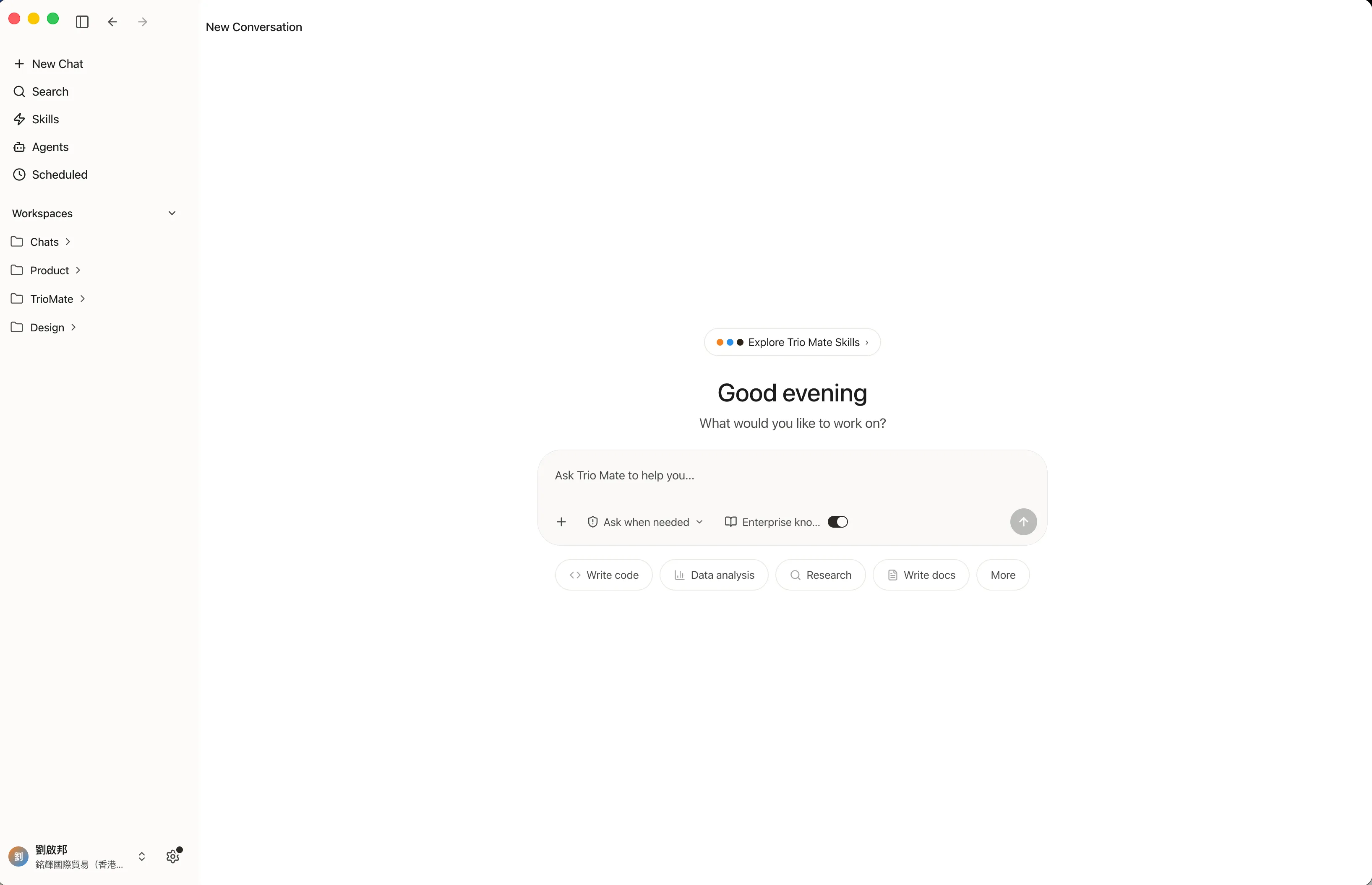
Trio Mate helps teams move from scattered information to coordinated action — across files, messages, tools, and repeatable workflows.
Ask for an outcome, not a prompt. For example: “Turn these customer feedback files into a weekly report with key issues and follow-up actions.”
Trio Mate reads and processes files within approved folders and workspaces, based on the access rules your company defines.
Use Skills to connect data processing, reporting, messaging, internal systems, and repeatable business workflows.
Generate reports, tables, charts, summaries, diagrams, email drafts, and workflow outputs your team can review and edit.
See which files were used, what steps were taken, which tools were called, and what outputs were produced.
Start with cloud deployment, use Hong Kong-based infrastructure, or plan a private deployment for stricter data and compliance requirements.
Trio Mate turns a plain request into deliverable work — and keeps every step visible and reviewable.
Tell Trio Mate what you need to produce, summarize, analyze, or follow up on.

It breaks the task into steps, calls the right Skills, and asks for confirmation when needed.

Inputs, steps, approvals, and outputs remain available for review.
Turn meetings, project notes, spreadsheets, and messages into executive summaries, risks, and next steps.
Group feedback by issue type, identify recurring themes, and create charts and follow-up lists.
Classify incoming messages, suggest responses, identify complex cases, and route work to the right team.
Extract key clauses, compare versions, and flag items for human review.
Summarize account context, prepare follow-up emails, and turn conversations into next actions.
Collect public signals, summarize movements, and create regular intelligence briefs.
Bring together tasks, documents, updates, and risks so teams can stay aligned.
Capture reusable context such as templates, project background, customer language, and team preferences.
Different organizations have different requirements for data residency, infrastructure, system access, and compliance. Trio Mate gives teams a practical path from fast pilots to controlled enterprise deployment.
For Hong Kong-based teams that need local infrastructure and a clearer data path.
For teams that want to start quickly, control cost, and validate business impact before scaling.
For organizations with strict data, network, and compliance requirements. Plan models, compute, and system access inside your own environment.
AI has mostly lived in personal chat windows. Trio Mate turns it into a shared layer for work: connected to files, tools, messages, workflows, and governance. For employees, it reduces repetitive work. For teams, it creates reusable workflows. For the business, it keeps AI usage visible, manageable, and aligned with internal rules.

Common AI capabilities, file processing, message channels, and task records in a single workspace.

Not just advice — it keeps organizing, generating, tracking, and updating results.

How a task ran, where results came from, and how things were adjusted — all on record.
Built for teams that need AI to move real work forward — with control the business can stand behind.




A chatbot answers questions. Trio Mate is designed to move work forward. It can use approved context, call Skills, produce deliverables, and keep a record of the process.
Because companies do not just need AI that can act. They need to know what it accessed, why it produced an output, and whether the process can be reviewed later.
Yes. Teams describe the outcome they need. Access, deployment, data boundaries, and Skills can be configured by the organization.
Reports, summaries, tables, charts, diagrams, email drafts, workflow outputs, and structured follow-up lists.
Trio Mate works with approved files and workspaces. Access can be configured by team, role, folder, workspace, task type, or Skill.
Yes. Depending on configuration, teams can keep records of inputs, steps, tool calls, approvals, and outputs for review and audit.
Trio Mate supports cloud deployment, Hong Kong-based infrastructure, and private deployment for stricter data or compliance requirements.
Most teams do not. Trio provides model access, compute, and orchestration. Dedicated models or custom infrastructure can be planned for special requirements.
A controlled, auditable workspace to run AI agents across company data, business tools, and daily workflows.
Requires macOS 13 Ventura or later, or 64-bit Windows 10 1809 (build 17763) or later, so Trio Mate can run tasks reliably in your system’s built-in secure environment.